Boolean Search for Recruiters: Operators, Examples and Strings to Copy
The five Boolean operators recruiters use, how LinkedIn and Google X-ray search each read them, how to build a string from a job brief, and 10 sourcing strings to copy and adapt.
Beatview Team
· 12 min read
Key takeaways
- Boolean search combines keywords with AND, OR, NOT, quotation marks and parentheses so a search returns people who match the brief, not everyone who mentions one keyword.
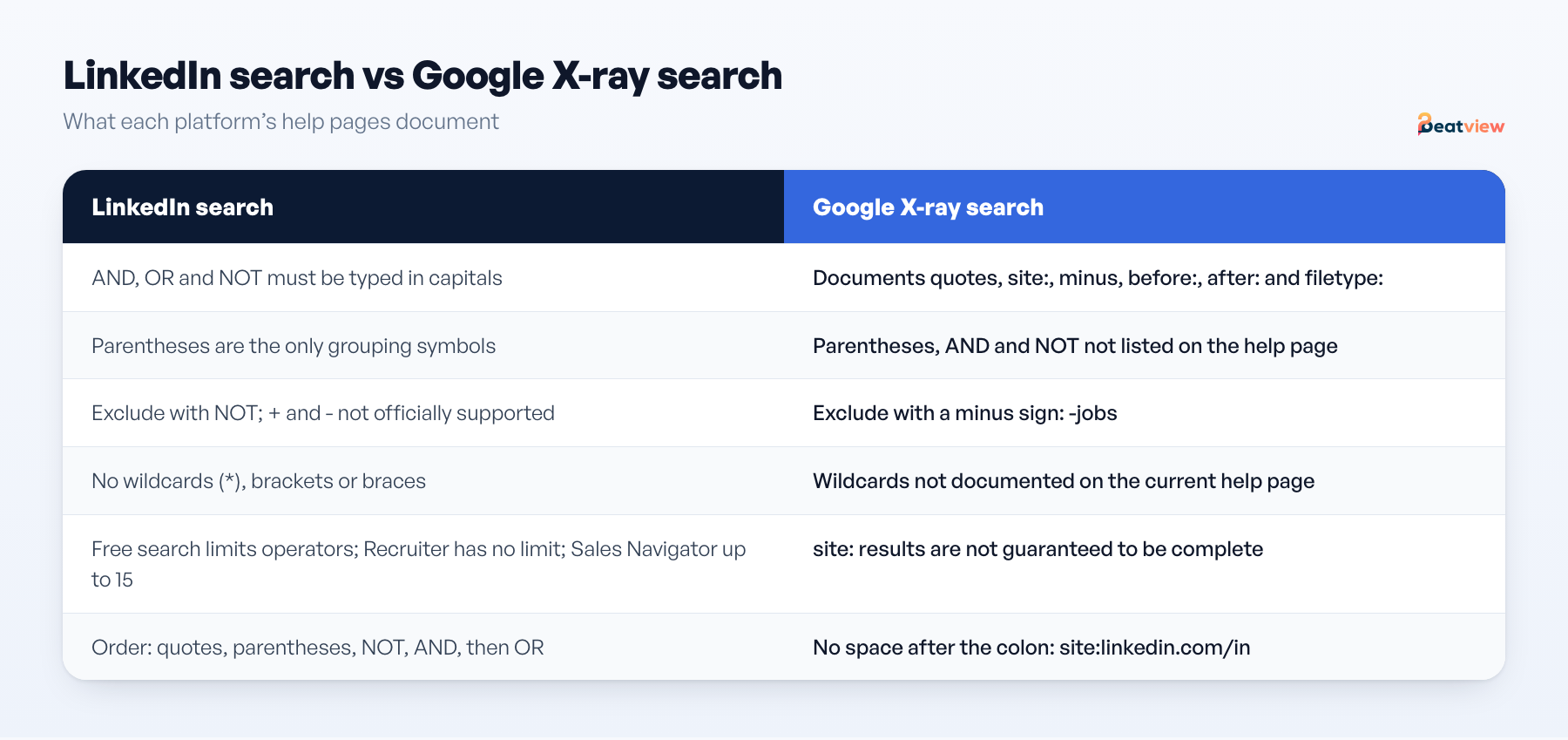
- LinkedIn requires AND, OR and NOT in capitals, recognizes only parentheses for grouping, does not support wildcards and does not officially support + or -.
- Google’s help page documents quotes, site:, the minus sign, before:, after: and filetype: — so exclude with a minus sign, not NOT, in X-ray strings.
- Build each string from the brief’s must-haves: one OR group of synonyms per requirement, joined with AND, with as few exclusions as possible.
- Sourcing creates data-protection duties: under UK GDPR, people whose details you collect from other sources must get privacy information within a month, or at first contact.
Boolean search for recruiters means combining keywords with logical operators so that LinkedIn, Google or a candidate database returns people who match a job brief, rather than everyone who mentions one keyword. The five core operators are AND (every term must appear), OR (any of the terms can appear), NOT (leave a term out), quotation marks (match an exact phrase) and parentheses (group terms so the logic runs in the order you intend). Each platform reads them differently, so below are the rules from LinkedIn’s and Google’s own help pages, a method for turning a brief into a string, and 10 strings to copy for common agency roles.
Boolean operators: what each one does on LinkedIn and Google
Scroll to compare →
| Operator | What it does | On LinkedIn | On Google |
|---|---|---|---|
AND | Every term must appear; narrows results | Supported; must be typed in capitals | Not listed on Google’s help page |
OR | Any of the terms can appear; broadens results | Supported; must be typed in capitals | Not on the current help page; a 2020 version documented putting OR between terms (marathon OR race) |
NOT | Excludes a term | Supported; capitals, placed immediately before the term | Not documented; use the minus sign |
"…" quotation marks | Matches an exact phrase | Supported; stop words such as “by”, “in” and “with” are not used | Supported: exact match of a word or phrase |
( ) parentheses | Groups terms so they are evaluated together | Supported; the only grouping symbols LinkedIn recognizes | Not documented on the help page |
- minus sign | Leaves out the word that follows | Not officially supported; use NOT | Supported, typed directly before the word: -jobs |
site: | Limits results to one website | Not applicable | Supported for a domain, URL or URL prefix: site:github.com |
filetype: | Limits results to one file type | Not applicable | Supported: filetype:pdf |
before: / after: | Limits results by the date a page was last updated | Not applicable | Supported: after:2025 |
* wildcard | Placeholder for unknown characters or words | Not supported | Not documented on the current help page |
On LinkedIn, the plus and minus signs may seem to work but are not officially supported, so use AND and NOT. On Google, type operators with no space before the search term: site:nytimes.com works, site: nytimes.com does not.
How LinkedIn reads a string: order of precedence
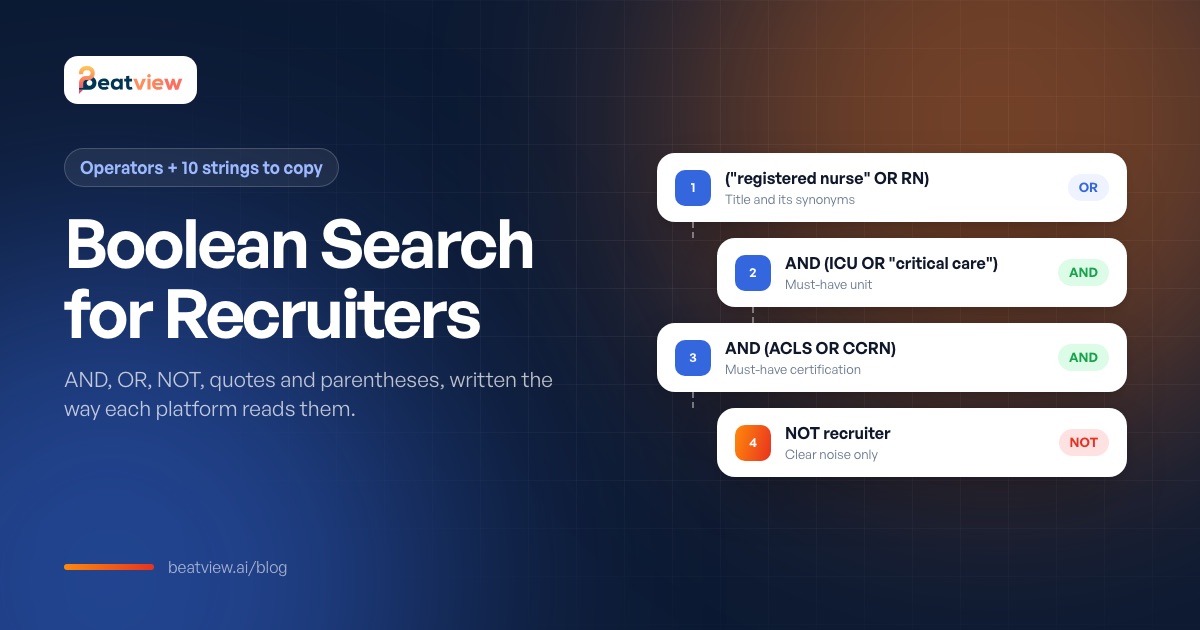
LinkedIn resolves quoted phrases first, then anything in parentheses, then NOT, then AND, and OR last. That order matters as soon as you mix AND and OR. nurse OR RN AND ICU is read as nurse OR (RN AND ICU), so it returns every nurse, whether or not they have worked in intensive care. Put each set of synonyms in parentheses and the meaning is unambiguous:
("registered nurse" OR RN) AND (ICU OR "critical care")Square brackets, curly braces and angle brackets don’t group anything on LinkedIn; they are treated as ordinary characters.
How to build a Boolean search string from a job brief
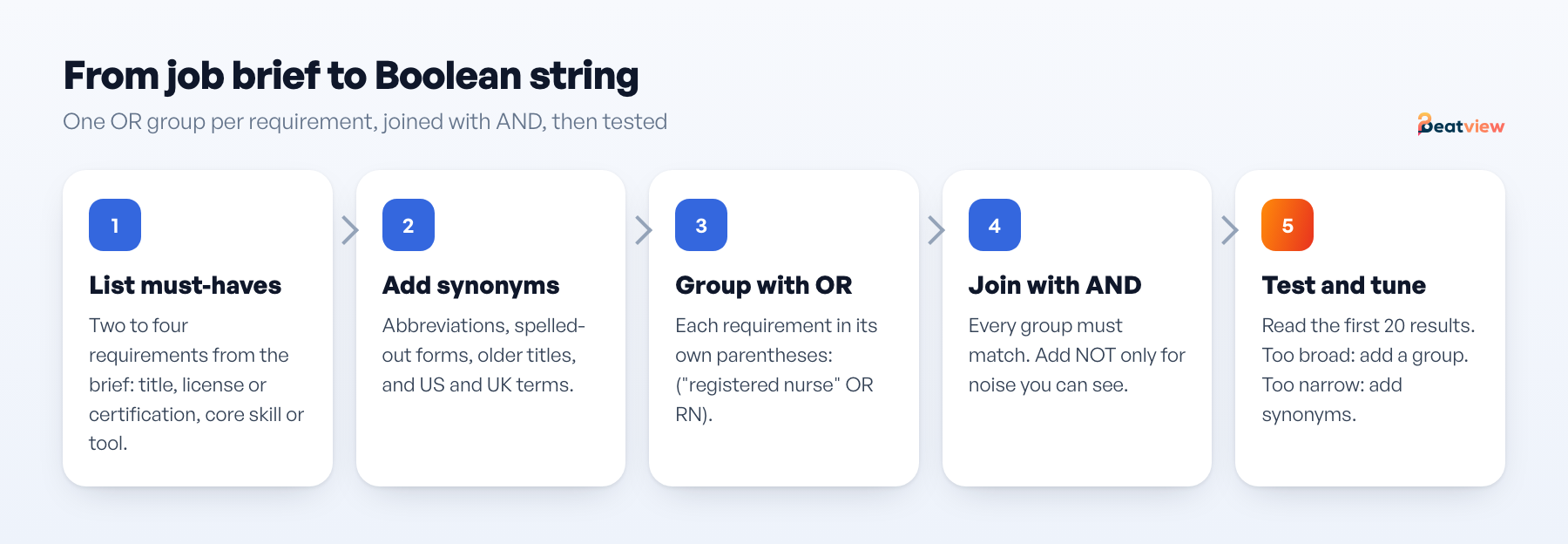
- Pick the must-haves. Take two to four requirements a suitable person would almost certainly mention on a profile: a title, a license or certification, a core skill or tool. Judge nice-to-haves when you read profiles.
- Write synonyms for each. List the title variants, abbreviations and spelled-out forms people actually use: RN and “registered nurse”, “account executive” and “sales executive”, “calendar management” and “diary management”. Include UK terms if you recruit there.
- Group each requirement with OR. Give each requirement its own parentheses, for example
("registered nurse" OR RN OR "staff nurse"). - Join the groups with AND. Every group must match, so each AND narrows the list.
- Exclude sparingly. Add NOT only for noise you can see in the results, such as recruiters whose profiles mention the job title. LinkedIn’s Recruiter help recommends building around related titles and essential skills rather than a long list of exclusions.
- Use filters for location and seniority. Set location in the search filters, not the string. LinkedIn’s Recruiter help suggests that when a Boolean query gets too long, you move items into the individual filters, such as Job titles.
- Test and tune. Read the first 20 results. If most are wrong, tighten a group or add one; if there are too few, add synonyms or drop the weakest requirement. Save the final string with the job so the next search starts from it.
Worked example: a client wants an ICU nurse in Chicago with ACLS and at least two years in critical care. The must-haves are the title, the unit and the certification. Chicago goes in the location filter, and years of experience are easier to judge on the profile than in a string:
("registered nurse" OR RN) AND (ICU OR "intensive care" OR "critical care") AND (ACLS OR CCRN) NOT recruiterLinkedIn search vs Google X-ray search
You can run a Boolean search by typing the string into the main search bar on LinkedIn.com, then narrowing to People results. How far you can go depends on the product:
- Free LinkedIn search limits the number of Boolean operators in a single query. LinkedIn says the limit keeps search fast and helps deter profile scraping, so long strings may need trimming.
- Recruiter and Recruiter Lite have no limit on the number of operators. Boolean works in the Job titles, Companies and Keywords filters (the Project filter doesn’t support it), and the Must have, Can have and Doesn’t have options correspond to AND, OR and NOT.
- Sales Navigator allows up to 15 Boolean operators per query, which matters if you also use it to find client contacts.
Google X-ray search
X-ray search means using Google to search inside one website with the site: operator. Google’s documentation says site: accepts a domain, a URL or a URL prefix, so site:linkedin.com/in keeps results to LinkedIn’s /in/ profile pages and site:github.com keeps them to GitHub.
site:linkedin.com/in "registered nurse" ICU Chicago -jobsTwo limits apply. Google says a site: query doesn’t necessarily return every indexed URL under the prefix, so X-ray finds some people, not all of them. And Google’s help page doesn’t list AND, NOT, parentheses or wildcards, so keep X-ray strings short: quoted phrases, one short OR list at most, and the minus sign for exclusions.
Use LinkedIn, ideally Recruiter, when you need precise logic and filters. Use X-ray to search sites that have no people search of their own, or to cross-check a LinkedIn search from another angle.
Boolean search strings for 10 common agency roles
Each string is written for LinkedIn keyword search. Set location in the filters, swap in the client’s tools and certifications, and drop the least common synonyms if a string runs past the free search’s operator limit. Each role links to matching interview questions so you can screen the people you find the same way.
1. Registered nurse
("registered nurse" OR RN OR "staff nurse") AND (ICU OR "intensive care" OR "critical care") AND (ACLS OR CCRN) NOT (recruiter OR "talent acquisition")Swap the unit group for the client’s specialty. Write “operating room” in full: on LinkedIn, a capitalized OR is an operator. Screen with registered nurse interview questions.
2. Software engineer
("software engineer" OR "software developer" OR "backend engineer" OR "backend developer") AND (Python OR Django) AND (AWS OR Azure OR GCP) NOT (intern OR student)LinkedIn doesn’t support wildcards, so list the variants you would have covered with develop*. Screen with software engineer interview questions.
3. Warehouse associate
("warehouse associate" OR "warehouse operative" OR "order picker" OR "material handler") AND (forklift OR "reach truck" OR "pallet jack") AND (RF OR WMS OR "inventory control")For a lead or supervisor role, add a title group such as ("team lead" OR supervisor OR "shift lead"). Screen with warehouse associate interview questions.
4. Accountant
(accountant OR "staff accountant" OR "senior accountant") AND (CPA OR "certified public accountant") AND (reconciliations OR "month end") AND (NetSuite OR QuickBooks OR Sage)For UK roles, replace the CPA group with (ACCA OR ACA OR CIMA). Screen with accountant interview questions.
5. HVAC technician
("HVAC technician" OR "HVAC tech" OR "HVAC service technician" OR "HVAC installer") AND ("EPA 608" OR "EPA certified" OR "EPA universal") AND (commercial OR refrigeration OR chillers) NOT (sales OR estimator)Swap the third group for residential terms if needed. Screen with HVAC technician interview questions.
6. Data analyst
("data analyst" OR "BI analyst" OR "business intelligence analyst" OR "reporting analyst") AND SQL AND (Tableau OR "Power BI" OR Looker) NOT (intern OR student)Add a domain group, such as (healthcare OR claims), when the client needs sector experience. Screen with data analyst interview questions.
7. Sales representative
("sales representative" OR "account executive" OR "sales executive" OR "business development") AND (B2B OR SaaS) AND (quota OR "new business" OR prospecting) NOT ("sales associate" OR retail)The NOT group removes store-based retail profiles; delete it for retail-channel roles. Screen with sales representative interview questions.
8. Executive assistant
("executive assistant" OR "executive PA" OR "personal assistant" OR "EA to CEO") AND ("calendar management" OR "diary management") AND (CEO OR founder OR "managing director" OR board)“Calendar” and “diary” cover US and UK wording for the same task. Screen with executive assistant interview questions.
9. Electrician
(electrician OR "journeyman electrician" OR "master electrician" OR "industrial electrician") AND (commercial OR industrial) AND (conduit OR PLC OR "motor controls") NOT (apprentice OR helper)Add the license the client requires, by name, as its own AND group. Screen with electrician interview questions.
10. Customer service representative
("customer service representative" OR "customer service advisor" OR "customer support" OR "call center" OR "call centre") AND (Zendesk OR Salesforce OR "inbound calls") AND (bilingual OR Spanish)Both spellings of center are deliberate, so profiles written in UK English still match. Screen with customer service representative interview questions.
Common Boolean search mistakes
- Lowercase operators on LinkedIn. LinkedIn requires AND, OR and NOT in capitals, and LinkedIn Recruiter lists “and”, “or” and “not” among the stop words it ignores in the Keywords filter.
- Using one platform’s syntax on another. NOT on LinkedIn, the minus sign on Google, and no wildcards on LinkedIn.
- Mixing AND and OR without parentheses. Because LinkedIn applies AND before OR, an ungrouped string usually returns far more people than you meant.
- Phrases that depend on stop words. LinkedIn drops stop words such as “by”, “in” and “with”. Its Recruiter help gives the example that “after sales” in the Keywords filter returns profiles that contain only “sales”.
- Too many exclusions. Every NOT can remove a good candidate who happens to mention the excluded word. Exclude only what you have seen cluttering the results.
- Pasting from a word processor. Word processors often turn straight quotes into curly ones, and neither LinkedIn nor Google documents how curly quotes are handled. Keep your strings in a plain-text file.
- Treating the results as the whole market. Profiles are incomplete and Google’s site: results are not exhaustive. A string finds people to look at; it doesn’t rank them.
Keeping Boolean sourcing legal and ethical
Boolean search finds information people have chosen to publish. What you do with it next is governed by the platform’s terms and by data protection law.
- Don’t scrape. LinkedIn’s User Agreement prohibits using software, scripts, robots, crawlers, browser plugins or similar tools to scrape or copy profiles and other data from its services. Search, read and save through the tools LinkedIn provides.
- Contact people through appropriate channels. Use the platform’s messaging or contact details the person has published for professional contact. Say who you are and which role you are recruiting for, and stop if they say no.
- Tell people you hold their data. Under UK GDPR, when you obtain personal data from somewhere other than the person — including a publicly accessible source — you must give them privacy information within a reasonable period and at the latest within one month. If you use the data to contact them, the latest point is your first message. A link to your privacy notice in that first message covers the timing. The ICO notes that its guidance is under review following the Data (Use and Access) Act.
- Keep only what you need. Record where and when you found each profile, keep it in your ATS or CRM rather than loose spreadsheets, and delete records you no longer need. Outside the UK, check the privacy rules where you and the candidates are based.
- Search on job requirements only. Don’t build strings around protected characteristics or their proxies, such as graduation years used to guess age.
After the search: screen the people you find consistently
A good string gives you a list of names. Turning it into a shortlist is where agencies lose consistency: recruiters read profiles differently, and phone screens vary with whoever makes the call. Send interested candidates to the job’s application link so they go through the same process as every other applicant.
Beatview screens each application against the criteria the agency sets for the role and runs structured AI video interviews, so every candidate answers the same questions and recruiters review the evidence before deciding who goes forward. The shortlist can then be shared with the client through a password-protected link. The Free plan covers one active job with unlimited candidates; AI interviews are on Pro. See Beatview for recruitment agencies and pricing, and browse the interview questions library for more roles.
Frequently asked questions
What are the Boolean operators recruiters use?
Five core operators: AND (every term must appear), OR (any of the terms), NOT (exclude a term), quotation marks (exact phrase) and parentheses (group terms). On Google, recruiters also use site: to search one website, the minus sign to exclude words, and filetype:, before: and after:.
Do Boolean operators have to be in capitals on LinkedIn?
Yes. LinkedIn Help says AND, NOT and OR must be typed in uppercase for the search to work correctly. LinkedIn Recruiter also lists lowercase and, or and not among the stop words it ignores in the Keywords filter.
Does LinkedIn support wildcards in Boolean search?
No. LinkedIn Help says it does not support wildcards such as asterisks, or braces, brackets and angle brackets. Write out the variants instead, for example developer OR development.
What is X-ray search?
X-ray search uses Google’s site: operator to search inside one website, for example site:linkedin.com/in for LinkedIn profile pages or site:github.com for GitHub. Google says site: accepts a domain, URL or URL prefix, but results are not guaranteed to include every indexed page.
Can I use NOT in a Google search?
Google’s help page does not list NOT. It documents the minus sign for excluding a word, typed directly in front of the word with no space, for example -jobs.
Is Boolean sourcing allowed under GDPR?
Searching is not the issue; storing and using personal data is. Under UK GDPR, if you obtain someone’s details from a source other than them, including a public one, you must give them privacy information within a reasonable period and at the latest within one month, or when you first contact them if that is sooner.
Sources
- LinkedIn Help. Use Boolean search on LinkedIn.
- LinkedIn Help. Boolean query limitations.
- LinkedIn Recruiter Help. Use Boolean to filter search results in Recruiter and Recruiter Lite.
- LinkedIn. User Agreement (section on things members agree not to do).
- Google Search Help. Refine Google searches.
- Google Search Help (2020, archived). Refine web searches (Wayback Machine copy, March 2020).
- Google Search Central. site: search operator.
- Information Commissioner’s Office. When should we provide privacy information?
Move an application from screening to interview
Use your configured workflow and review the completed result.
Start with one active job for free, or explore how Pro adds AI video interviews.
- Application screening
- AI video interviews
- Candidate event log
Related Articles
How to Screen Resumes Quickly Without Missing Good Candidates (5 Steps)
A five-step resume screening process for recruiters: criteria a resume can evidence, a batch intake check, review against criteria, a written rule for clear passes and a manual check of exceptions.
Candidate Screening Process: 7 Stages, Methods and a Free Checklist
What candidate screening is, the screening methods compared, a seven-stage process with an owner and output for each stage, and a downloadable candidate screening checklist.
Screening Interview Questions: 30 Questions to Ask Candidates
30 screening interview questions for recruiters, grouped into capability, logistics, motivation and role-specific questions, with what good answers include, a 15-minute phone screen script and questions to avoid.